Dotnet unsafe buffer manipulation
C# has this luxury of having several layers of abstraction. The unsafe keyword has always been a mystery to me until now. This isn't the first time I've played around with pointers, but it is the first time I've done it in C#.
First thing we will need before we start coding is an array of bytes!
var bytes = new byte[] { 0x61, 0x62, 0x63 };These bytes correspond to this sequence of characters abc. Those are taken from the ASCII table.
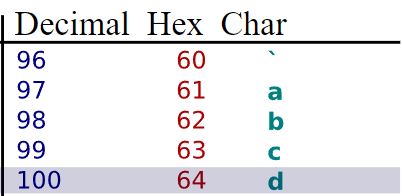
0x prefix means that we are dealing with hex values.
Question is, do 0x61, 0x62, 0x63 always correspond to abc? No, it depends of how they are encoded.
In our case, we have chosen ASCII as our character encoding. Now we have everything to display abc in the terminal!
var message = System.Text.Encoding.ASCII.GetString(bytes, 0, bytes.Length);
Console.WriteLine(message);
Easy as that! Bytes are decoded.
Let's play a little game, what do you think the message will look like using UTF8 character encoding? Tricky one isn't?
var message = System.Text.Encoding.UTF8.GetString(bytes, 0, bytes.Length);
Console.WriteLine(message);
In fact, ASCII is a subset of UTF8, which means that the complete ASCII table is included in UTF8. Oh yes, backwards compatibility! Therefore, message remains the same.
Let's go wild and cross the unsafe barrier. One mandatory setting needs to be enabled in the Build tab.

Or by adding AllowUnsafeBlocks in your csproj.
  <PropertyGroup>
    ...
    <AllowUnsafeBlocks>True</AllowUnsafeBlocks>
  </PropertyGroup>
Take a look at the next block of code.
unsafe
{
    fixed (byte* ptr = bytes)
    {
        ...
    }
}
There's a lot going on there.
First thing we see is an unsafe code block. This can be seen as a barrier that indicates that the following lines will be tricky. At least compared to our first implementation.
The unsafe keyword denotes an unsafe context, which is required for any operation involving pointers
Keyword fixed indicates that the byte array, the buffer is now a fixed sized buffer. This operation is necessary to be able to recover the pointer of the variable. If this is not the case, the C# compiler could relocate the variable which would lead to the loss of the pointer.
Using an alternative signature of GetString, we can pass the pointer and retrieve the message abc!
var message = System.Text.Encoding.ASCII.GetString(ptr, bytes.Length);
Console.WriteLine(message);
There we go, your first experience juggling with pointers in C#.